 Four Letter Records

Artemis
FLR·001Low-latency monitoring for any interface. Route anything anywhere with your own virtual console.
In alpha: the first 100 licenses are free. 100 left.
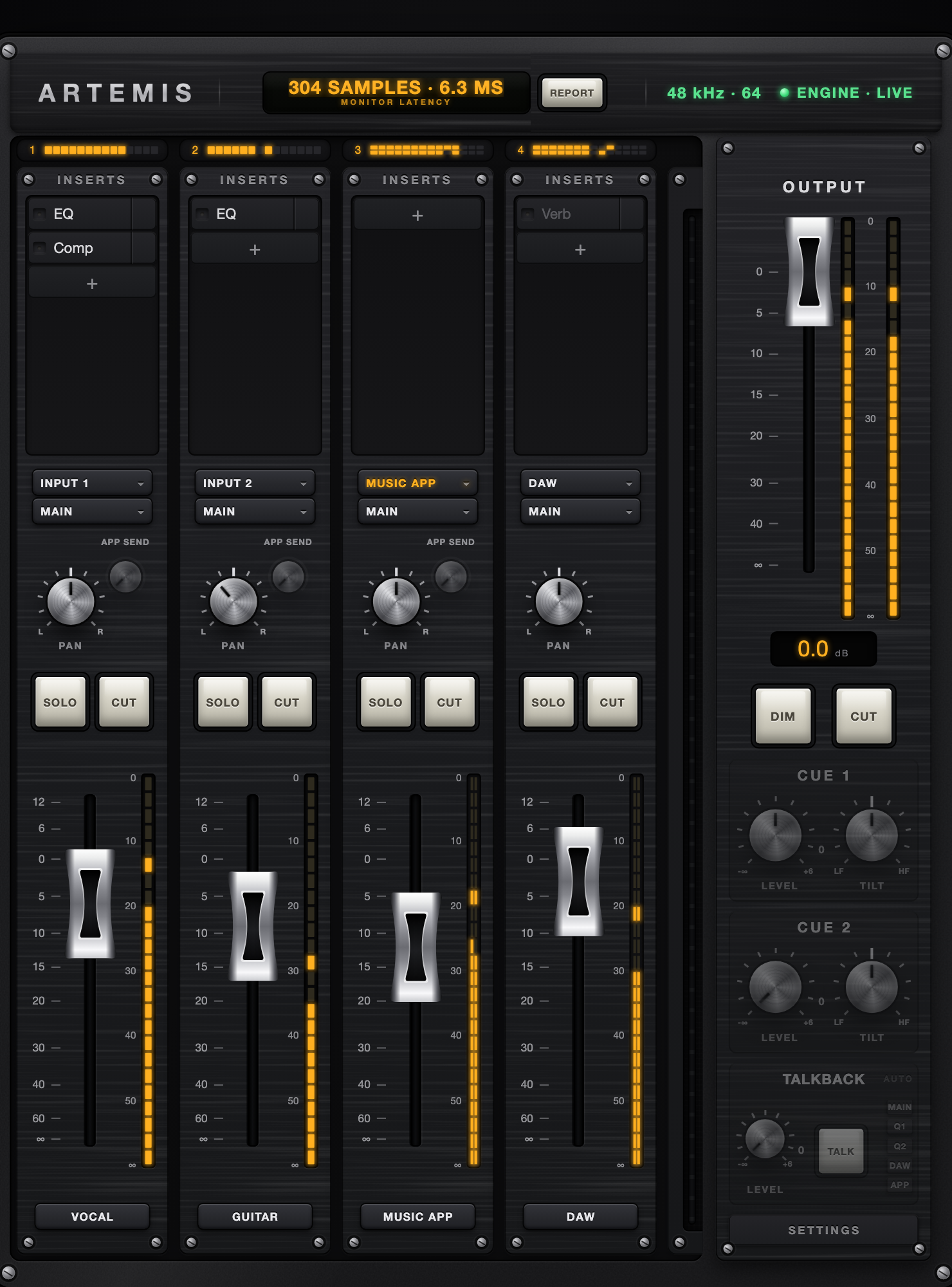
Record with the full mix. Forget the delay.
Hear your whole plugin chain the moment you sing it, at your interface’s own latency. No DSP hardware.
- Your plugins, in the monitor path.Up to ten per track, your own Audio Unit effects.
- Record it dry or print the effect.One switch per plugin. Printing runs a separate chain, so you can tweak what you hear without touching what’s recorded.
- The take never hears your headphone mix.Ride the fader, cut it: the DAW keeps recording at full level.
Your own virtual console.
Everything a console’s monitor section does, on the interface you already own. Up to twelve tracks.
- Two cue mixes.The artist’s and yours, each with its own level and tone. Your dim and cut never touch their headphones.
- Talkback, hands-free.Hold TALK on screen, on a hotkey that works in any app, or on any MIDI pedal. Auto Mode opens it whenever the DAW stops.
- Every knob and fader on your controller.Click, touch, move. It remembers.
Route anything anywhere.
Hardware inputs, apps, the DAW, cues, outputs. Pick the source and the mix right on the track.
- Apps become tracks.A browser, a music app, a video call, each with inserts and a fader.One app per track on macOS 14.2 or later. Earlier: all apps together, through Artemis App Send.
- The whole console in one file.Tracks, inserts, routing, mixes, talkback and MIDI maps. Save it, open it as a template, undo your moves.
- Latency, measured.On the readout, and reported to your DAW so takes land where you played them.
Works with what you own.
Any interface
Artemis mirrors it as a device named Artemis, with your interface’s own channel names, and does the processing on your Mac.
Any DAW
Set its audio device to Artemis. It sees your inputs and outputs, plus sends back into the console.
Any Mac
macOS 12 or later, Apple Silicon or Intel, with your own Audio Unit plugins.
Kind to your ears
Faders wake at the floor and levels glide in. Switching interface or buffer fades down and back up, never a pop.
Nothing added to playback
What your DAW sends is what the interface gets, bit for bit. If a mix clips, you hear it.
Try it first
Without a license Artemis runs five minutes per launch, then glides to silence.
Get Artemis
One purchase, no subscription. Your license arrives by email within seconds and works on every Mac you own.
No activation and no machine lock. The installer is signed and notarized by Apple: double-click it. It installs the Artemis audio driver and asks you to restart your Mac once. Then allow the microphone permission, macOS’s name for audio input. Help on the support page.
Need help? Press REPORT at the bottom of the console: it attaches your logs to an email for you. Or write to [email protected].
In alpha: the first 100 licenses are free. 100 left.
Claim a free alpha licenseOne per email address. The same license a buyer gets, and it never expires.
Already have a license? Sign in